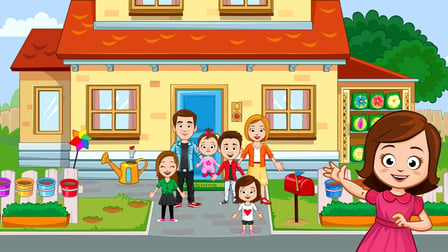
My Town Home: Family Playhouse is an imaginative online dollhouse game that invites players to create their own family adventures. Whether you're playing on a desktop, tablet, or mobile device, enjoy a seamless, unblocked gaming experience without any downloads or registrations. Dive into a vibrant two-story house filled with six unique rooms, each offering endless possibilities for storytelling. Customize your characters, cook delightful meals in a spacious kitchen, and enjoy fun outdoor activities in the backyard, such as jumping on a trampoline or having a picnic.
Key Features of the Game
- Endless Creativity: Play out imaginative stories in an open sandbox environment where there are no limits.
- Interactive Environment: Engage with various objects in the house, from cooking in the kitchen to watching TV.
- Creative Mini-Games: Complete entertaining mini-games, like washing a teddy bear or popping balloons, to earn rewards.
- Custom Character Outfits: Choose and change clothing for each character to fit your story perfectly.
- Robot Vacuum Wheel of Fortune: Try your luck with the robot vacuum that brings you exciting prizes.
- Family Album Collection: Gather cards to fill a family album, capturing all those enjoyable moments.
Why Players Love My Town Home: Family Playhouse
Players are captivated by My Town Home: Family Playhouse due to its splendid graphics and interactive nature. The game allows players to unleash their creativity by providing a wide range of activities without restrictions. Gamers appreciate the freedom to explore and craft their narratives, making every gaming session unique and enjoyable. Plus, the accessibility on various devices ensures that players can indulge in their creative escapades anytime, anywhere.
How My Town Home: Family Playhouse Compares to Similar Games
When compared to games like
The Sims and
Toontastic, My Town Home excels in its child-friendly approach, allowing younger audiences to explore family dynamics and storytelling without any adult themes. Unlike
Animal Crossing, which emphasizes community interaction, My Town Home focuses on individual narratives and creativity, appealing to players who prefer a personalized gameplay experience.
Frequently Asked Questions
What is the goal of My Town Home: Family Playhouse?
The goal is to create your own stories and play with unique family scenarios in a spacious house.
How do I control the game on PC and mobile?
On PC, use the mouse to click and interact; on mobile devices, tap with your finger.
Are there any limitations to character customization?
You can customize your characters' outfits, with no strict limitations on how you portray your stories.
Can I save my progress and return later?
Yes, the game allows you to save and resume your adventures at any time.
What kind of mini-games are available?
Mini-games include fun activities like popping balloons and washing teddy bears for extra rewards.
Related Entities
Genres related to this game include Simulation, Casual, and Family games that allow for narrative-driven interactions and creative storytelling.